uTorrent Turbo Booster

uTorrent Turbo Booster

trusted
DOWNLOAD 9.42 MB
4.3  (25 votes)
4.7
This program received 5 awards
Questions & answers
Wiki
Suggest a correction

Video tutorial & screenshots

  • About
  • Main Window
  • Setup Wizard
  • Main window
  • General view
  • General view
  • Main window
  • uTorrent Turbo Booster 3.0 Accelerating Download Speed
  • uTorrent Turbo Booster 3.0 in Taskbar (Green Icon)

Editorial review

All comments (3)

Pedro Castro Senior editor

uTorrent is probably the most popular P2P file sharing application and uTorrent Turbo Booster is a complement for this widely used application that offers to increase the download speed. It is said to work by discovering more seeds, or available peer sharing connections, thus exploiting your network’s capabilities to the fullest.
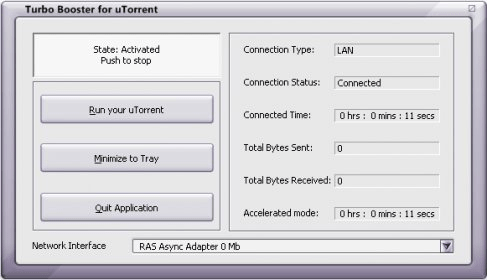
This program’s interface is very easy to use. It has four buttons whose functions are unmistakable. The first button’s function is to activate the acceleration, and it will be active by default. There are also buttons to run your uTorrent, minimize the application to the System Tray or quit it. You must also pay attention to selecting the right network interface because this program may have some problems at identifying the right interface when you are using a wireless card. A panel on the right will show you the details of your connection, such as connection type, status, connected time, total sent and received bytes, as well as the time the program has been in accelerated mode.
While minimized, there will be a small green button in the System Tray. By just double-clicking on the green round icon there, you can open the application’s main interface; however, a right-click will show a menu that allows you to set the application to run at startup and to resume downloads automatically. In addition, there are some options that point to help about P2P sharing, anonymous torrent downloading, among other types of information.
In general, uTorrent Turbo Booster is a fine intuitive application, and it will do its job without affecting your system’s performance noticeably. Good news is that there is a completely functional free version. Bad news is that it will keep disturbing quite frequently with an annoying register screen.

Pros

  • It is easy to use.
  • It is rather unobtrusive.

Cons

  • It may fail to identify the right network interface.
  • The free version shows an annoying window from time to time.
This software was checked for viruses and was found to be clean. Click here to see antivirus report.
trusted
DOWNLOAD 9.42 MB
 

Publisher's description

uTorrent Turbo Booster is a recent plug-in designed to improve the functionality of probably the most popular P2P file sharing application around – uTorrent. This tool comes equipped with modern technology that aims at getting your download speed way up so you can grab the files you want so badly much quicker than you’ve been used to. Movies, music, games, applications, you name it - uTorrent Turbo Booster will deliver at a fast pace. It will be there doing its job in the background without upsetting any other activity you might perform on your computer.
Another benefit you’ll gain by using this high-end module is a higher number of download sources - more seeds will be available to you than normally discovered by your uTorrent.

Latest comments

 
  • 0
    Bryan 2 years ago

    This tool really increased my download speed.
    You just have to start it, it`s very simple and easy to use.

  • 0
    Earl 2 years ago

    The speed is fantastic, it works smoothly and it hasn`t gave me any problems so far.
    All in all, excellent booster!

  • 0
    Kyle 3 years ago

    I`m very happy with it.The speed improvement is really visible by me!


loading
Download Software Informer Client
